
Seller’s Bay
SEO tools & resources
Ecommerce SEO
Product SEO overview
Shopify SEO tools
WooCommerce SEO tools
Product description generator
Content & research
SEO content tools
Organic Visibility
Rank tracking
White-label SEO reports
Resources & pricing
SEO software for agencies · Built by an agency
Your client SEO, organised in one workspace.
Track rankings, create articles, improve product content and share client reports. Seller’s Bay brings your agency’s SEO work together, with control over what you publish.
10 days · 100 credits · One campaign
No card required. No automatic subscription.
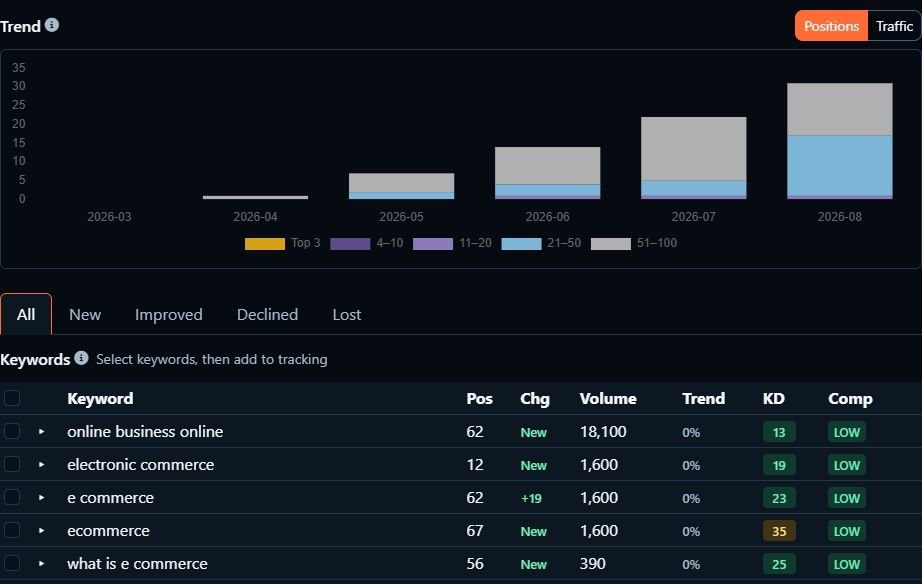
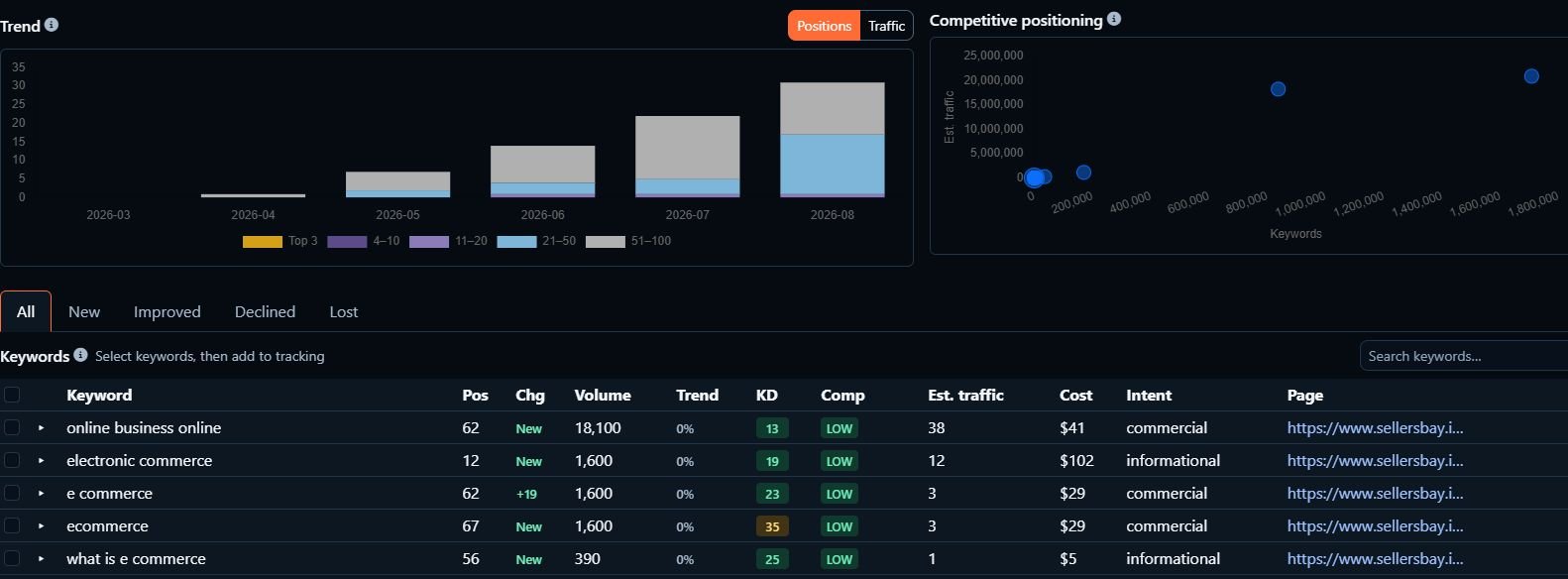
Inside Seller’s Bay: saved Organic Visibility data for our own website. Example results, not a ranking guarantee.



FEATURES
From your next keyword to your next client report.
Choose the tools you need for each client: keyword tracking, product SEO, article planning and reporting. Keep the work organised in a separate campaign, from the first idea to the finished update.
Product SEO
Create titles, descriptions, meta descriptions and image alt text for WooCommerce and Shopify products. Check the facts, refine the wording and choose which changes to sync.
PRODUCT COPY EXAMPLE
Before: “Blue mug”
After: “350 ml Blue Ceramic Mug”
Use only verified product details. Review the title, description and SEO fields before syncing.
Keyword rankings
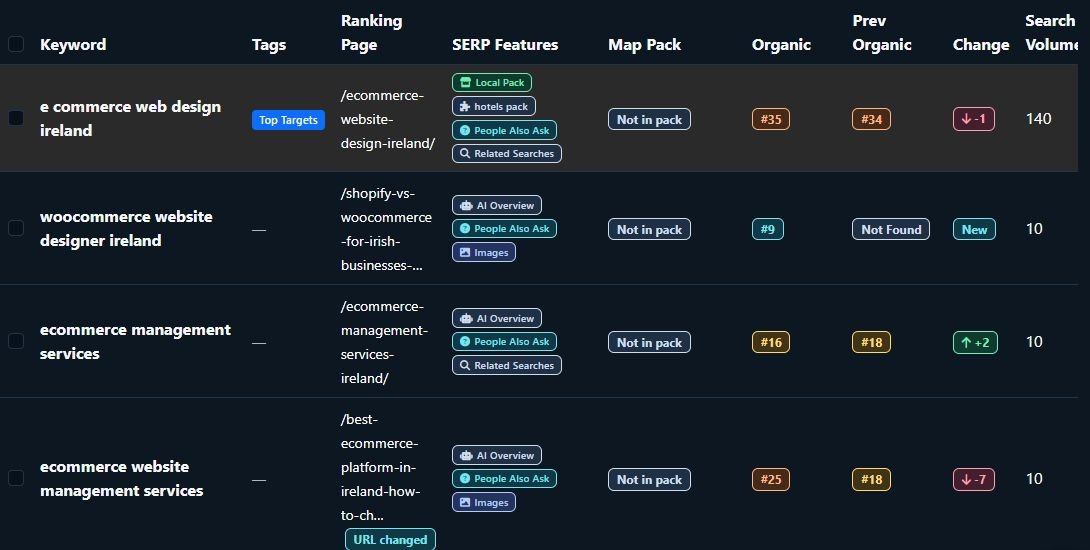
Follow ranking changes for the keywords you choose. Run checks on demand with credits, or enable weekly tracking with an eligible subscription.
Content planning & articles
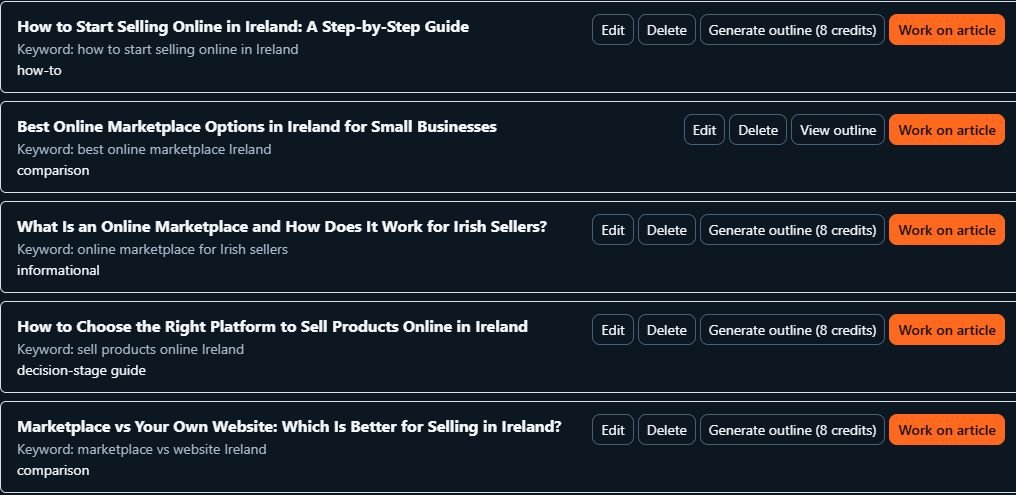
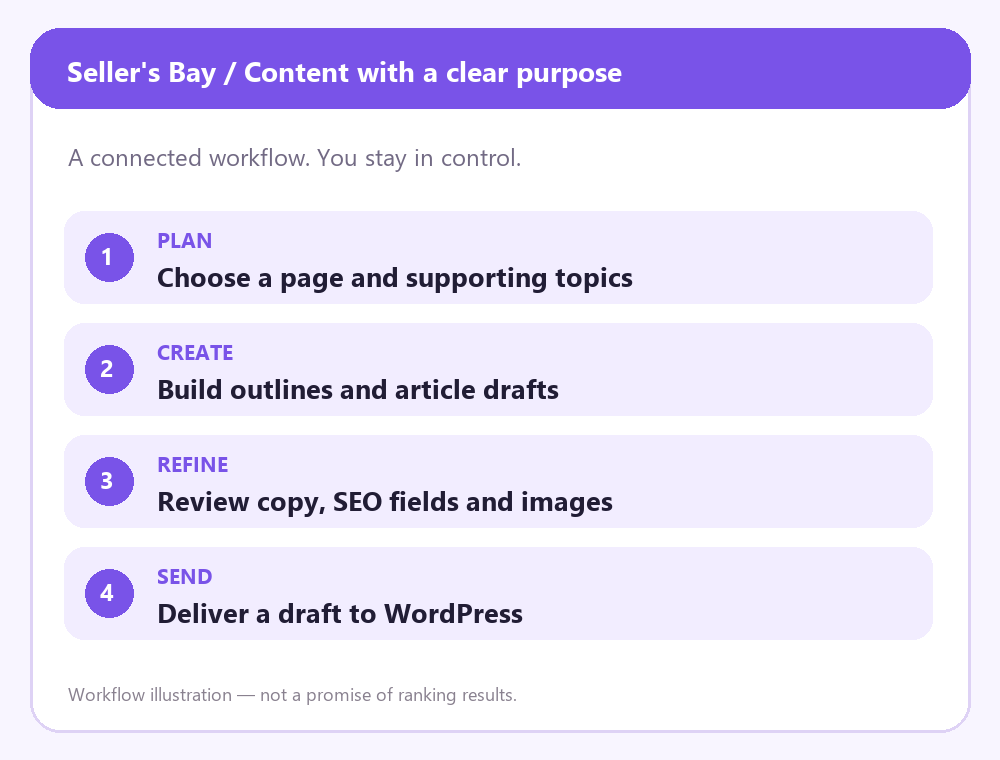
Turn topics into outlines and editable article drafts, including SEO titles, meta descriptions and FAQs. Refine the content, then send it to WordPress as a draft.
Organic Visibility
Discover organic keywords and landing pages beyond your tracked keyword list. Review saved results or refresh them using credits, with optional weekly refreshes.
Branded reports & client portals
Present results under your agency’s brand and choose which campaign sections clients can view. Reporting and portal access depend on your plan.
YOUR BRAND. YOUR CLIENT’S VIEW.
Agency branding
Selected campaign sections
Read-only client access
Separate client campaigns
Keep each client’s keywords, products, content and reports in a separate campaign. Choose a plan with the campaign capacity and staff seats your agency needs.
ONE CAMPAIGN PER CLIENT
Keywords & search visibility
Content plans & article drafts
Connected store products
Keep the client context with the work.
WHY SELLER’S BAY
Built around the way agencies work.
Seller’s Bay is built by an agency for the practical work of managing client SEO. Compare the workflow or book a free walkthrough to see how it fits your business.

Start with one client
Use the trial to explore one campaign with your own website. Start with a ranking check, a content plan or product copy.
Keep editorial control
Check product facts and match the client’s voice before you sync changes or publish an article.

Make reports useful
Give clients a clear view of the work and results. Explore the SEO report template for an example structure.
INTEGRATION
Built around the websites you manage.
Connect WooCommerce and Shopify for product SEO, WordPress for articles, and Search Console for search insights.
Stores, content and reporting in one workflow

WAYS TO GET STARTED
Start small. Choose how you grow.
Use credits for on-demand keyword checks and supported data or AI actions. Monthly plans add a credit allowance, campaign capacity and plan-specific features such as branded reports, client portals and staff seats. Check the included tools before choosing.
Try Seller’s Bay for 10 days
100 credits · 1 campaign · No card required · No automatic paid subscription
Start your free trialFAQS
A few things worth knowing.
Straightforward answers about setup, content, client work and credits.
Who is Seller’s Bay for?
Agencies and freelancers managing SEO for client websites and online stores. Each campaign keeps the client’s work together.
How can I get help?
Use the contact form or email support@sellersbay.com with your setup or product question.
Which platforms can I connect?
WooCommerce and Shopify for product work, WordPress for articles, and supported Google connections for campaign insights. Availability can depend on your plan.
Will AI changes go live automatically?
Generating a draft does not publish it. Review product changes before syncing them. Articles can be sent to WordPress as drafts.
How do credits work?
Credits pay for AI generation and supported data actions. You can buy packs without a subscription. Monthly plans include credits and access to additional features; buying credits alone does not unlock every tool. The app shows the cost before a chargeable action.
Can I try the app first?
Yes. The trial includes 10 days, 100 credits, one campaign and one competitor / organic report. No card is required and it does not become a paid subscription automatically.
What can my clients see?
Client portals provide read-only access to the campaign sections you choose to share. Your team remains responsible for managing the work.
Can my team work with me?
Eligible plans include staff seats and role-based access. Check the current plan details for the number of seats and campaigns included.
HOW IT WORKS
A practical workflow for every client.
Four steps to get your first campaign moving. See the full workflow.

01 · Connect
Website & store setup
Create a campaign and connect the client’s website or store.

02 · Research
Choose your priorities
Choose relevant keywords, review your website’s pages and decide where to focus.
03 · Create & review
Approve before publishing
Prepare product content or articles. Refine the draft and approve what is ready.
04 · Measure & share
Make progress visible
Follow keyword rankings and share clear, branded reports with your client.
BLOG
Practical ideas for your next SEO project.
Guides to product content, campaign management and clearer client reporting.
October 8, 2026
·
By Robert Long
Is AI-Generated SEO Content Safe for Google Rankings in 2026?
Start with your next client campaign.
Try one client campaign for 10 days with 100 credits. No card required, and no automatic paid subscription.
10 DAYS · NO CARD
Start free trial

LET’S TALK
Contact us
Seller’s Bay
A connected workspace for agencies and freelancers managing client SEO.
© 2026 Seller’s Bay. All rights reserved.
Support
Third-party names and logos, including WooCommerce, Shopify, WordPress and Google products, belong to their respective owners. They are shown only to identify supported platforms and integrations. Seller’s Bay is not affiliated with, sponsored by or endorsed by these companies or organisations. All copyright and trademark rights remain with their respective owners.