
KEYWORD RANK TRACKING
Agency rank tracking software for clear client updates
Track the keywords that matter to each client, in the market you choose. Keep completed checks, ranking pages and history with the campaign, then use the evidence to decide what deserves attention.
See keyword tracking with Robert Long, CEO of Seller’s Bay. Free personal walkthrough; no app account needed to book.
Read the result in context
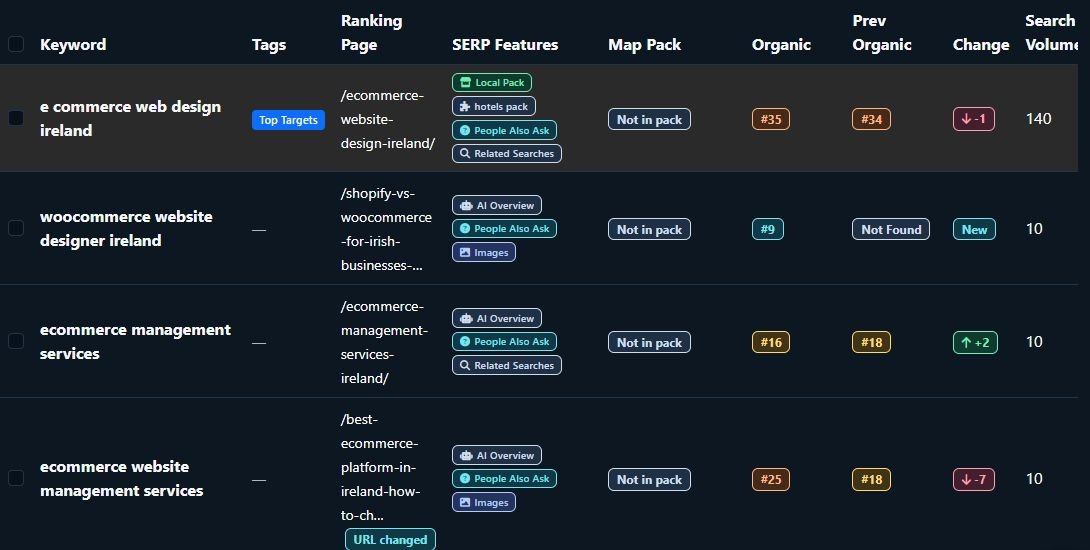
Keyword — the search term you selected.
Location — the market for the check.
Ranking page — the URL found for your website.
Last checked — when that result was recorded.
Illustrated checklist. All numerical examples below are fictional.
Choose the keywords and location before comparing results.
A rank tracker records where a website appears for selected search terms under a defined search context. Create a campaign for the client website, choose country, language and tracking location, and add a focused keyword list.
Review your website’s Organic Visibility
Organic Visibility shows the organic keywords and landing pages found for your campaign website in the selected market. Check the saved report date before using it. Refresh manually when needed, or enable weekly refreshes using eligible credits. Each refresh uses credits; the app checks the balance before it runs. Estimates are separate from measured Search Console traffic.
Separate each client
Keep the website and keyword list in its own campaign. A Shopify or WooCommerce connection is optional for keyword tracking.
Choose the tracking mode
Basic tracking focuses on organic positions. Advanced tracking can include additional search metrics and Map Pack information when the required business profile is configured. Review the mode and credit cost before a run.
Choose relevant priorities
Choose relevant keywords, a consistent market and the campaign website. Use saved ranking results to decide which pages need closer review.
Read positions, ranking pages and “Not Found” carefully.
Use the result’s last-checked time to establish how current it is. A recorded position describes the returned result for that check; it does not describe every searcher’s experience.
Position and ranking URL
Review which page ranks, as well as its position. A different URL appearing for the same keyword may affect how you interpret movement. Compare checks with the same location and setup.
Not Found and missing values
“Not Found” means the website was not identified in the returned search results for that completed check. It is not proof that the page is absent from Google’s index. N/A means a metric is unavailable; a failed or incomplete run is a separate situation.
Search volume, CPC, competition and estimated traffic are different measures. Advertiser competition does not establish organic ranking difficulty. Estimated traffic is not measured visits or revenue.
A fictional example: movement needs a comparable baseline.
Example Home Store · UK national checks · illustrative dates. The terms and results below are made up and are not Seller’s Bay’s or a client’s rankings.
A measurable change
Keyword: oak bedside table
1 September: position 18
15 September: position 12
Same page: example.com/oak-bedside-table
The page moved six places closer to the top in these fictional checks. Review the page changes and wider evidence before attributing the movement to one action.
A result without a numeric comparison
Keyword: narrow bedside cabinet
1 September: Not Found
15 September: position 24
The later check found the page at position 24. Without a numeric starting position, do not invent an exact number of places gained. Record the new baseline and watch the next comparable checks.
Ask Robert to show completed checks, filters and campaign history in your free demo.
Run a check when you need fresh data, or choose a weekly schedule.
Creating a campaign does not start tracking automatically. Manual tracking is a separate action, with the displayed credit cost. Wait for the current run to finish before starting another.
Manual keyword checks
Run the campaign’s tracking list or an individual keyword when the controls offer it. Review progress and completed results. Filters help you focus on areas such as Top 10, striking distance, improving, declining and not ranking.
Optional weekly tracking
Subscribers can enable weekly keyword tracking. The panel shows estimated usage before you enable it. You can turn it off, and it pauses when the next full run would exceed available credits.
Weekly tracking is an option you control; this page does not turn on any schedule.
Turn ranking history into a useful client conversation.
Campaign history and keyword trends help you review completed checks over time. One baseline establishes a starting point; several comparable checks provide more context for movement.
Use saved results and available history in branded SEO reports and the read-only client portal. Exports use saved data; downloading a report does not run a new check.
Keep rank tracking separate from measured search clicks and visits. Google Search Console’s Performance report includes average positions across its recorded impressions, which can differ from a tracker’s selected check.
Check plans and credit options for campaign limits. The cost shown in the app takes priority over an illustrative estimate on a marketing page.
Rank tracking questions, answered.
What is agency rank tracking software?
It records results for selected keywords and keeps them organised by client campaign. Seller’s Bay combines those checks with history, ranking pages and reporting, so an agency can explain the evidence to each client.
What does Not Found mean?
The website was not identified in the returned results for that completed keyword check. It is not an indexing diagnosis or proof that the page never ranks. Verify the website, keyword, market and run status.
Can I choose a country or location?
Campaign setup lets you choose a country, language and tracking location. Use a consistent setup when comparing results over time; results in one country do not describe every other market.
Is tracking daily by default?
This page describes manual checks and optional subscriber weekly tracking. Creating a campaign is separate from running a check or enabling a schedule.
Can weekly tracking be turned off?
Yes. Weekly tracking is optional and controlled in the campaign. Review the usage estimate before enabling it; the schedule pauses if the next full run cannot fit the credit balance.
Do ranking exports use fresh checks?
Exports use saved campaign results. To get newer results, run the relevant check separately and review its credit cost first.
Will tracking improve my rankings?
Tracking measures results; it does not itself improve a page. Use the evidence to plan relevant changes, then compare later results and actual traffic or conversions.
See your next client reporting workflow with the CEO.
Bring the markets and keywords you care about. Robert can show tracking setup, completed results, history and how to use them in a clear client update.
Free personal walkthrough · One-hour booking · Choose Zoom Meeting to see the app
Explore all features, follow the campaign workflow, or contact us.