
FREE CEO WALKTHROUGH
Book a free Seller’s Bay demo with the CEO
Get a personal walkthrough with Robert Long, CEO of Seller’s Bay. See how content, product SEO, keyword tracking and client reporting fit together — and ask the questions that matter to your work.
Free walkthrough · One-hour booking · Choose a time on Zoom Scheduler
Built for agencies and freelancers managing client SEO, and store owners working on their own ecommerce content.
Your client work, in one campaign
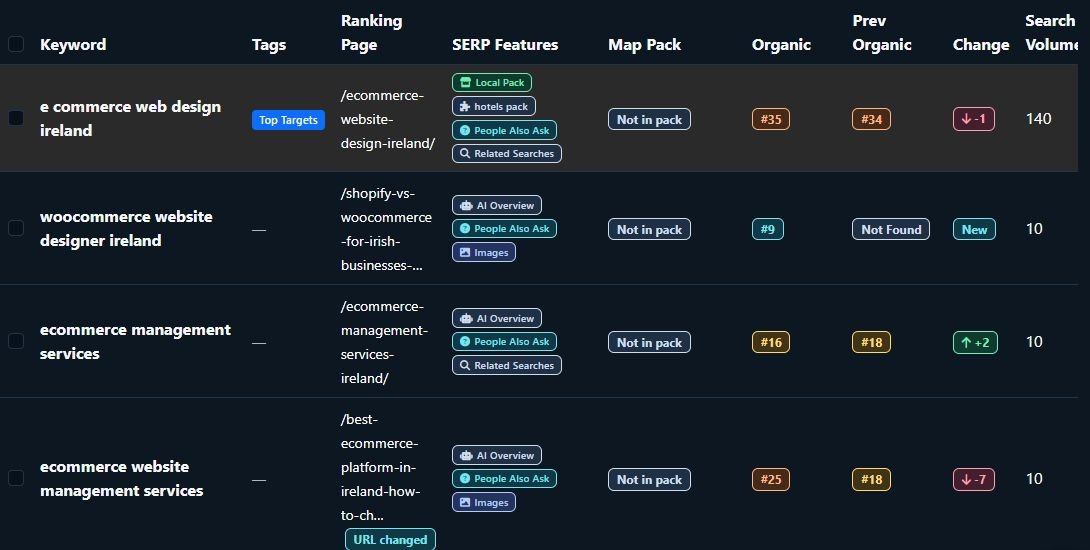
Campaign workspace preview. Your walkthrough focuses on the tools relevant to you.
Bring your workflow and your questions.
We’ll focus on the tools that are relevant to you.
See the workflow that matters to you.
Seller’s Bay is SEO software for agencies and freelancers. It keeps client research, product content, articles, keyword checks and reporting together in campaigns. The demo explains how the tools work and where your review and approval fit in.
Product content, with review first
See how WooCommerce and Shopify product titles, descriptions, metadata and image alt text can be prepared, edited and approved before selected changes are synced.
From topic to WordPress draft
Walk through content planning, outlines and editable article drafts. See the review steps before an article is delivered to WordPress as a draft.
Rankings and reports you can explain
See keyword tracking, campaign history and branded client reporting. Ask how read-only client access and plan limits apply to your work.
Explore the Seller’s Bay features or six-step client workflow before your call. Feature access and credit costs depend on the action and your plan.
A walkthrough with the person behind Seller’s Bay.
Robert Long, CEO of Seller’s Bay
Talk directly with Robert about how the app would fit your client work. Bring your questions about the workflow, connected stores, content review, reporting or available plans.
You do not need to connect a client account or bring passwords to see the app. If you have a website you want to discuss, bring its public URL and a clear first priority.
Make the demo useful for you
- The kind of clients or store you work with.
- The task that takes the most time today.
- The platforms you use: Shopify, WooCommerce or WordPress.
- What you want to understand before choosing a plan.
How to book your free demo.
Booking is handled through Robert’s Zoom Scheduler. Choose a time that suits you and make sure the displayed timezone is correct.
1. Choose an available time
Open Zoom Scheduler, check the timezone and select an available appointment. The current booking is one hour.
2. Select Zoom Meeting
Enter your name and email, and choose Zoom Meeting for an on-screen walkthrough. The scheduler also offers a phone call; use Zoom Meeting if you want to see the app.
3. Bring your questions
You can add a short note about what you want to cover in the booking form. Check the booking confirmation for the appointment and meeting details.
The button opens Zoom Scheduler. If no time suits you, contact us about a demo or email support@sellersbay.com.
Read the Privacy Policy for how Seller’s Bay handles enquiries. Zoom displays its own booking and privacy information when you enter your details.
Questions before you book.
Is the Seller’s Bay demo free?
Yes. This is a free personal walkthrough with the CEO. It is separate from a self-serve app trial or a paid plan. You can ask about the available plans and credits during the call.
Who is the demo for?
Agencies and freelancers managing client SEO, and ecommerce store owners who want to understand how Seller’s Bay could fit their work. Tell us whether content, product SEO, rankings or reporting is your main priority.
How long is the demo?
Robert’s current Zoom Scheduler reserves a one-hour appointment. Choose an available time and check the timezone before booking.
Will I see the app, or is this a phone call?
Choose Zoom Meeting in the booking form for an on-screen walkthrough. The scheduler also offers a phone-call option, so select the meeting format that matches what you need.
Do I need an app account or connected store?
You can book and see the workflow before connecting a client store. You do not need to share passwords or account credentials for the walkthrough. A public website URL and a clear question are enough to start the discussion.
Can we focus on Shopify, WooCommerce or WordPress?
Yes. Let Robert know which platform matters to you. Shopify and WooCommerce support product workflows; WordPress receives reviewed article drafts. The call can focus on the relevant connection and review steps.
What if I cannot find a suitable time?
Use the contact page or email support@sellersbay.com to ask about another time. If you have already booked, refer to the booking confirmation for appointment details and any available rescheduling options.
See how Seller’s Bay fits your next campaign.
Get a walkthrough of the tools you are interested in, understand the review steps and ask Robert your questions.
Free demo with the CEO · Choose Zoom Meeting to see the app