
FREE SEO REPORT TEMPLATE
An SEO reporting template for clearer client updates
Download an editable monthly SEO report template and a filled fictional example. Use them to explain what you checked, what changed and what should happen next. The files are available directly, with no signup required.
Free personal walkthrough with Robert Long, CEO of Seller’s Bay. No app account needed to book.

A useful report starts with the client’s goal
Keep search visibility, website visits and meaningful enquiries separate. Add the work completed and the next actions so the numbers have a clear purpose.
Download the template and example
Both XLSX workbooks contain a Report sheet and an Actions sheet. Open them in a spreadsheet application that supports XLSX. Amber cells are editable; the percentage-change column calculates from your previous and current values. The example uses invented figures and tasks throughout.
These are standalone reporting resources. They do not connect to your accounts, import data or trigger a Seller’s Bay report. Replace the fictional sample with verified information before sharing it with a client.
Preview the filled SEO report sample
This fictional outdoor-store example shows the reporting layout. It demonstrates how to present a change without claiming that one edit caused it. The downloadable workbook also includes priorities, owners, due dates and review status.
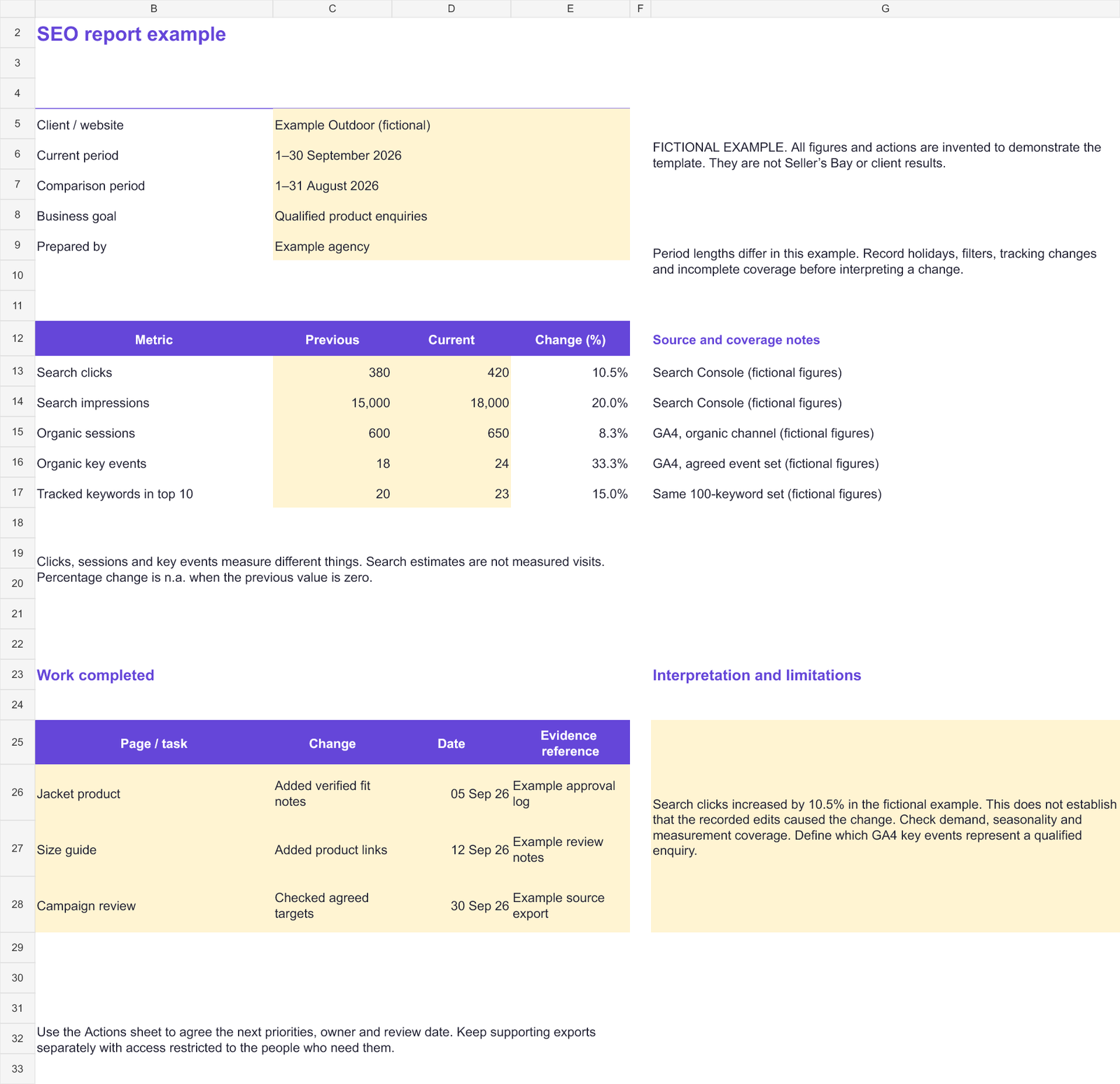
Start with the reporting period and business context
Enter the client or website, both date ranges, the business goal and who prepared the report. Record period lengths and the source filters. For a store, the goal might be qualified product enquiries or purchases; for an agency client, agree which outcome matters before choosing the metrics.
Same basis
Use matching properties, channels, countries, devices and definitions where possible. Explain any change in tracking or coverage.
Realistic interpretation
Record seasonality, promotions or unusual events. A change between periods is an observation; it does not establish the cause.
Report rankings, traffic and conversions separately
Use Search Console clicks and impressions for Google search performance, GA4 organic sessions for on-site visits, and an agreed GA4 key-event set for meaningful actions. Use a consistent tracked keyword set for the ranking count. Do not label a visibility estimate as actual traffic.
Search visibility
Include the market, keyword set and check dates. A selected-keyword count is not a complete picture of every search that reaches the site.
Visits and enquiries
Define the channel and the event. A page view, form start and completed qualified enquiry should not all be described as the same conversion.
The workbook leaves a change blank when a numeric input is missing. If the previous value is zero, it displays n.a. because a percentage increase cannot be calculated from that baseline. A measured zero remains a valid input.
Connect the work completed to the next decision
Record the page or task, the actual change, its date and a reference to the approval or supporting evidence. Then explain the main observation in a few sentences. Keep any client data and supporting exports in the appropriate private location.
Completed work
For example: verified product specifications, edited a size guide or reviewed the tracked targets. Record the actual result, rather than listing planned work as completed.
Next actions
Use the Actions sheet to agree priority, a specific task, the owner, due date and status. Review the result before marking it done.
See how Seller’s Bay supports client reporting
The workbook gives you a manual starting point. Seller’s Bay’s reporting workflow brings campaign information into branded reports, with client access controlled by the information you choose to share. Available report sections depend on the campaign data and plan. See the workflow before deciding how it fits your reporting process.
Metric guidance and sources
Google’s documentation explains the difference between Search Console performance and Analytics behaviour, and how traffic-source scope affects reporting. Check these definitions when selecting your source reports.
Reviewed 4 October 2026. Sources: Search Console Performance report, Search Console and Analytics reports, and Analytics traffic-source scopes.
Questions, answered.
What should an SEO report include?
Include the goal, reporting period, source coverage, meaningful metrics, completed work, interpretation and agreed next actions. Choose the metrics for the client’s business rather than adding every available chart.
How do I use this monthly SEO report template?
Download the blank XLSX, enter verified figures and record the matching source definitions. Add completed work and next priorities, review the calculations and explanations, and share only the client’s approved information.
Is the filled SEO report example real client data?
No. Its company, figures and tasks are fictional. It demonstrates the structure and calculation behaviour and is not a claim about Seller’s Bay or a client’s results.
Does the template generate reports automatically?
No. It is a manual spreadsheet with a percentage-change formula. For the app’s campaign reporting and branding workflow, explore the reporting page or book a free demonstration.
Walk through client reporting with the CEO
Book a free personal demo with Robert Long. See a fictional report example, ask about campaign data and client access, and discuss the reporting workflow you need.
Free personal walkthrough · One-hour booking · Choose Zoom Meeting to see the app